


Race Monitor
3.5348.00 Reviews
App Specs
- Version
- Varies with Device
- Updated On
- License
- Free
- Downloads
- 500,000+
- Developer
- Race Monitor
- Categories
- Sports
- Platform
- Android
Screenshots
 Analysis by AppCompare
My first impression of Race Monitor is that it is most useful when a race is happening somewhere other than where I’m standing. It brings timing information onto a phone, turning a distant event into something I can follow while I’m away from a television or trackside board. That makes it appealing to motorsport fans, but also to anyone keeping an eye on a friend or family member taking part in a race.
When the live connection matters
The app’s central promise depends on timely race information reaching your phone. In practice, I would treat a live timing screen as a companion to the event, not a guaranteed replacement for being there: the usefulness of any changing race display depends on a working connection and on timing information being available for that event. If you are heading somewhere with patchy reception, it is sensible to check the event before you leave rather than assume every race will behave the same way.
That network dependence changes how I would use it. At home, I can keep a race open while doing something else and glance back at the standings. At a circuit, I would be more selective: check the relevant race or driver when I have a signal, then avoid relying on constant refreshing if the connection is weak. A timing app is most valuable when it answers a specific question quickly—who is ahead, how a watched competitor is doing, or whether the order has changed—rather than when I expect it to reproduce every part of a broadcast.
Built for a phone, not a full broadcast
Race Monitor is a sports app from Race Monitor, and its focus is narrower than a general sports-news app or a video-streaming service. It is aimed at people who care about race timing and competitor progress, not at viewers looking for commentary, replays, or a complete picture of the event. That distinction matters: if I want to follow positions while listening to coverage elsewhere, a compact timing view can be a useful second screen; if I want the race explained for me, a broadcast or dedicated video service is the better fit.
A realistic use case is a friend racing while I am at work or on the way to meet family. I can check in during a break, search for the event or driver, and get a clearer sense of how things are going than a stream of vague messages would provide. I would avoid checking the screen while driving, of course; the useful moment is when I am safely stopped or have time to look. For spectators already at a venue, it can also help make a race easier to follow when the action is spread across a course and a single viewing position does not show everything.
What to do when information stalls
Live timing can feel uncertain when a screen stops changing. A quiet display does not automatically tell me whether the race has slowed, the event’s timing feed has paused, or my connection has dropped. I would first check whether other parts of the phone can load, then give the timing view a moment before reopening or searching for the event again. That small pause helps avoid mistaking a brief network interruption for a change in the race.
I also would not use a single delayed-looking screen as the sole basis for an important decision, such as deciding whether someone has finished or where to meet them. If the distinction matters, confirm through the event’s official communication or directly with the person involved. This is not a flaw unique to this app; it is a sensible limit for any phone-based live timing tool. The practical trade-off is convenience in exchange for depending on both connectivity and the quality of the event information reaching the app.
Worth Reading Before You Choose

EA SPORTS FC Mobile 26 Is a Bigger Football Game, but It Takes Time

Flipboard Shows What News Apps Must Do Beyond the Feed

Switching to Android Auto Means Rethinking Your Driving Routine

Google Calendar Makes a Crowded Week Easier to Manage

Ludo King Makes the Most of the Minutes Between Plans

Baby Panda World Brings Quick Play to Modern Phones, but Its Game Library Feels Busy
Choosing when to spend data and attention
Because this is a live race companion, I would use it deliberately rather than leave it open all day. Pick the event or competitor you actually care about, check at natural breaks, and close the screen when the result is no longer useful. That approach is kinder to your attention and avoids treating a phone as if it were a dedicated timing board. If you are on a limited mobile plan, using a trusted Wi-Fi connection when available is a reasonable way to keep routine browsing off cellular data; I would still expect live checks away from home to need a connection.
There is also a small but important distinction between following a driver and following every detail of a race. If I am watching one person, narrowing my attention to that competitor makes the information easier to interpret and less distracting. If I am comparing the overall order, I would check the broader race view at a few meaningful points instead of trying to monitor every change. This is a better fit for a phone screen and for the stop-start way most people check updates during an ordinary day.
Getting Started with Race Monitor
First things first, downloading and setting up Race Monitor is as straightforward as it gets. Available on both Android and iOS, the app is just a quick download away from the Google Play Store or Apple App Store. Once installed, you’re greeted with a simple and user-friendly interface.
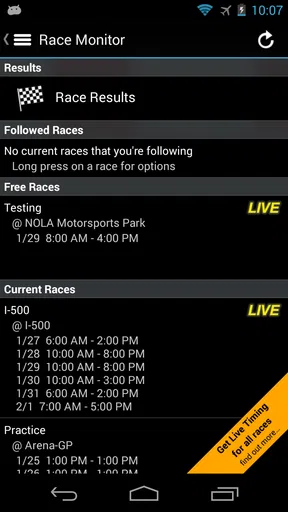
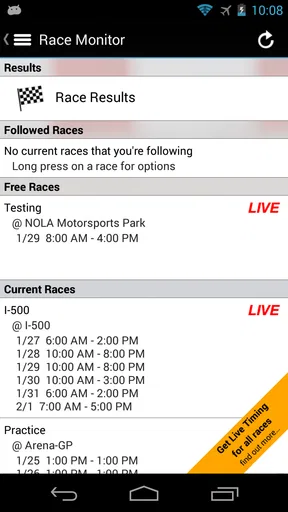
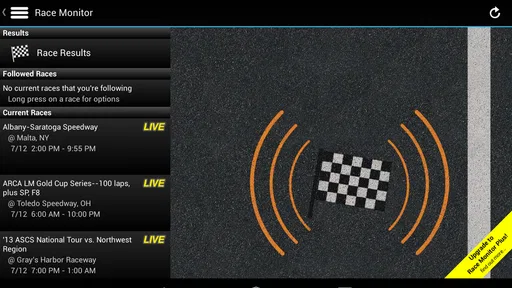
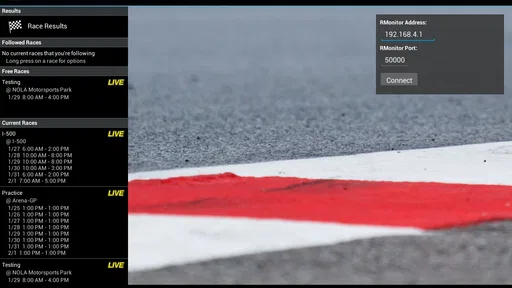
The app's main screen showcases a list of ongoing races, which is perfect if you’re looking to jump straight into the action. It’s like having a personal pit crew right on your phone, keeping you updated with every twist and turn of the race.
Diving into the Features
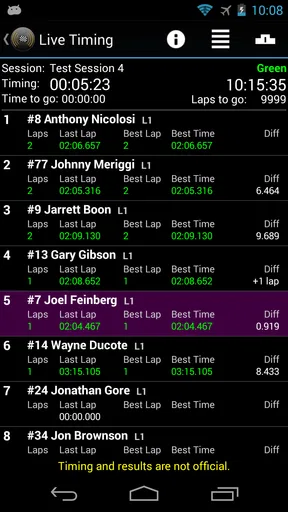
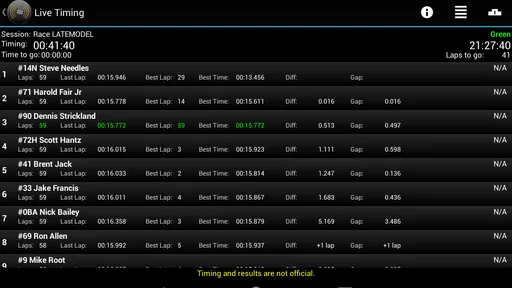
One of my favorite aspects of the app is its real-time race data. Picture this: you're watching a race, and you want to know every detail—lap times, positions, the whole shebang. Race Monitor delivers all that and more. It’s like being in the control room with all the stats at your fingertips.
Another nifty feature is the ability to follow specific drivers. Whether you're supporting a friend or following your favorite pro, the app lets you track their performance with ease. Plus, you can view the race from multiple perspectives, thanks to the variety of data available.
Oh, and did I mention the alerts? You can set notifications to stay informed about specific events or updates during the race. It's like having your own personal commentator.
Exploring the Interface
The design of Race Monitor is sleek and intuitive. Navigating through the app is a breeze, whether you're checking out live races or browsing past events. The developers have done a stellar job making sure the app is both functional and visually appealing.
One feature I found particularly useful is the search functionality. It allows you to quickly locate races or drivers, saving you the hassle of scrolling through endless lists. It’s those little conveniences that make the app stand out in the crowded world of racing apps.
Finding the right event and following it sensibly
The fastest way to make the app useful is to start with the event rather than browse aimlessly. Search for the race you expect to follow, then check that you have the right event before choosing a driver or looking at timing details. Similar event names can be confusing when several races are taking place, so I would use the event context—such as the venue or the competitors I recognize—to make sure I am watching the intended one.
Following a driver is especially handy when I care about one entrant more than the overall field. It narrows the question from “what is happening everywhere?” to “how is this person doing?” That is a practical advantage on a small screen, where scanning every position can become tiring. For a family member participating in a race, I would set up the relevant view before the start if possible, then use it for occasional checks rather than trying to keep pace with every update.
Notifications can help when I cannot keep the app in front of me, but I would choose them with restraint. Alerts are useful when a particular update matters to me; too many prompts can become noise during a busy day. I would also keep in mind that a notification is a convenience, not a substitute for opening the race and checking the current picture when accuracy matters. The app’s value is strongest when I decide in advance what I want to follow, rather than expecting it to interpret the whole event on my behalf.
Price, expectations, and alternatives
Race Monitor is free to install, with in-app purchases listed from $0.99 to $6.99 per item. I would begin with the free experience and decide whether the way I follow races suits me before considering any purchase. The key question is not simply whether a paid option exists, but whether I need more than occasional timing checks. Someone who follows races regularly may see more value in exploring the available options, while a casual fan who only checks a result now and then may be perfectly content to keep use simple.
Its average rating is 3.4 from around 1.7 thousand ratings, and it has more than 100 thousand installs. I read that as a sign of an established, actively used niche app rather than a universal sports essential. The rating also encourages realistic expectations: race timing is a specialized need, and the experience can depend on the event and connection as much as on the interface. Race Monitor is rated for Everyone and has been available since December 2010, so it has a long history as a phone-based way to follow racing.
Compared with a general sports app, Race Monitor is more focused on race timing and less suited to broad news, scores across many sports, or editorial coverage. Compared with watching a stream, it offers a different kind of value: quick information about positions and laps rather than the sights and sounds of the race. I would use a broadcaster for context and atmosphere, an event’s own channels for announcements, and this app when I want timing details in a compact form. These tools complement one another better than they compete directly.
For a spectator, one useful habit is to decide when a timing check will actually improve the experience. If I can see the start and finish but lose sight of a competitor elsewhere on the course, checking progress can fill that gap. If I am watching a broadcast, keeping the phone nearby may answer a question without interrupting the video. But if the app is distracting me from a race I can already see, I would put the phone away and enjoy the event directly.
For a participant’s supporters, the app can also help coordinate expectations without turning timing into a promise about arrival. A position or lap update may tell me how the race is unfolding, but it does not necessarily tell me precisely when to leave home or where a competitor will be after the finish. I would use it to stay informed, then confirm practical plans with the person or event organizers. That boundary keeps a useful timing tool from being asked to do the job of direct communication.
Community and Connectivity
Racing is all about community, and Race Monitor nails it here too. You can connect with fellow racing aficionados and share your thoughts on the latest races. It’s like joining a global pit stop where fans and drivers come together.
Moreover, if you're a bit of a tech geek like me, you’ll appreciate the app’s integration with social media. Sharing your favorite moments or insights from a race is just a tap away, making it easy to keep your friends in the loop.
Who will get the most from it
I see the clearest fit for motorsport fans who want timing details at hand, people following a friend or relative in an event, and spectators who need a way to keep track when the course makes the action hard to see. The search and driver-following tools suit users with a specific race or competitor in mind. Someone who only wants highlights, commentary, video, or broad sports headlines should look elsewhere; this is a focused companion, not an all-purpose way to consume sport.
It may also be a poor match for anyone who expects uninterrupted updates in places with unreliable reception. Before depending on it at a venue, I would test whether the phone has a usable connection there and keep another source in mind for crucial details. That is not a reason to avoid the app altogether; it is simply the right way to judge a live service. If the race is important to your plans, use the app for awareness and a direct source for confirmation.
Final Thoughts
To wrap it up, Race Monitor is a must-have for anyone who lives and breathes motorsport. Its comprehensive features, user-friendly interface, and vibrant community make it a powerhouse in the racing app arena. Whether you’re tracking a local event or an international championship, this app ensures you’re always in pole position.
So, what are you waiting for? Download Race Monitor today and shift your racing experience into high gear!
My connectivity verdict
I would recommend Race Monitor when timing is the part of a race I most want to follow and I have a dependable way to get online. It is particularly useful as a quick-check companion: find the event, focus on a driver or the race order, and return when an update would answer a real question. That workflow is more comfortable than leaving the screen open and trying to absorb every change.
I would skip it if my main goal were video, commentary, or a complete race-day guide, and I would not make it my only source for decisions that depend on exact timing. The app’s strength is focused access to race information; its trade-off is that live usefulness relies on connectivity and the event feed. Used with those limits in mind, it is a practical option for keeping a race within reach without pretending a phone screen can replace the event itself.
Pros
- Real-time race updates enhance experience.
- User-friendly interface for easy navigation.
- Supports multiple racing events worldwide.
- Customizable notifications for races.
- Detailed driver and team information.
Cons
- Limited offline functionality.
- Requires stable internet for updates.
- Free version has ads.
- Some features are paywalled.
- Occasional data sync issues.
FAQs for Race Monitor
What is Race Monitor and how does it work?
Race Monitor is an app designed to provide real-time race data for motorsport enthusiasts. It connects to live timing systems used by various racing events, allowing users to track lap times, positions, and other race metrics. This enables fans and participants to stay updated with the latest race developments on their mobile devices.
Is Race Monitor free to use, or does it require a subscription?
Race Monitor offers a free version with basic features, but for access to premium content such as additional races and advanced stats, a subscription is required. The subscription model provides a more comprehensive experience, ideal for serious race fans who want in-depth coverage and analysis.
Which devices and platforms are compatible with Race Monitor?
Race Monitor is available for both Android and iOS devices. It supports a wide range of smartphones and tablets, ensuring that users can enjoy the app’s features on their preferred platform. Always check the app store for the latest compatibility requirements and updates.
Can I use Race Monitor to follow any motorsport event?
While Race Monitor covers a broad range of motorsport events, it primarily depends on the event organizers to provide live timing data. Users should check the app’s schedule or contact race organizers to confirm if their desired event is supported. This ensures they can access real-time data during the races.
How accurate is the data provided by Race Monitor?
Race Monitor relies on the accuracy of the timing systems used by event organizers. While generally reliable, the data is subject to the precision and functionality of these systems. Users can expect high accuracy for most major events, but occasional discrepancies may occur due to technical issues.


